


Here’s the hard reality that should give every agency owner a sense of discomfort: 85% of B2B marketers admit that they don’t use marketing automation tools to their fullest potential [1]. Not because tools are too expensive, nor because marketers don’t have the skills. Because the underlying process was built for a world where one AI assistant forgot what your client’s name was the moment you closed the browser window.
That world no longer exists.
The agencies that are currently growing fastest aren’t using more tools. They’re using Claude Projects to build permanent, brand-specific AI workspaces that remember every client’s brief, every tone-ofvoice document, and every campaign’s results—forever. If you want to know how to use Claude for marketing automation in a way that actually gets better over time, rather than just saving a few minutes per task, then this is the guide you’ve been waiting for.
This guide will show you exactly how to use Claude for marketing automation to build a permanent agency brain.
Why Generic AI Workflows Fail Agencies (And What to Do Instead).
Most teams within AI agencies use AI in much the same way: open a chat window, paste in a bit of context, create an output, and close the tab. Next day, repeat, from scratch.
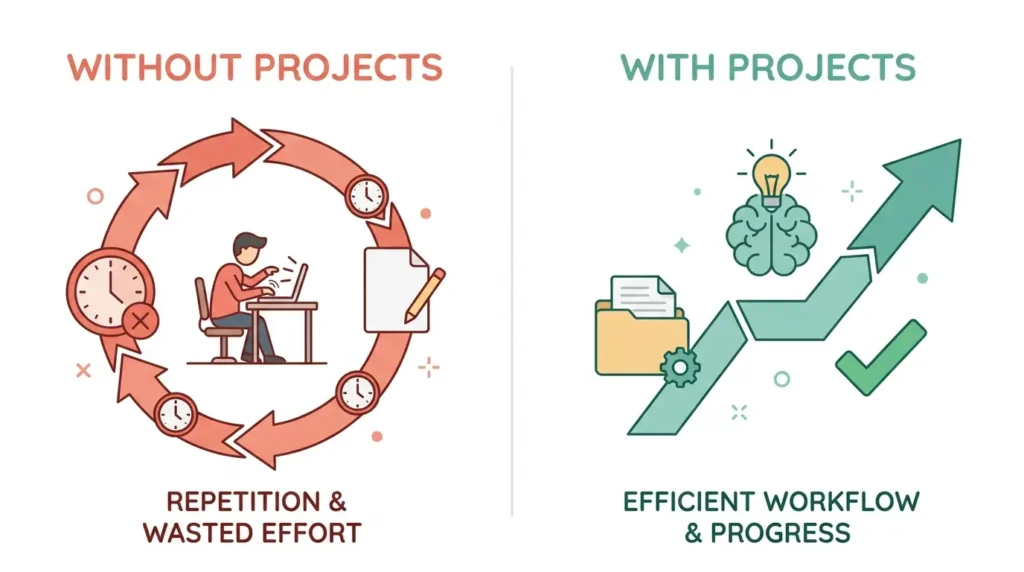
This phenomenon, known as the “cold start problem,” silently drains productivity.
Each time you open a new conversation with Claude without a Project configured, you’re forced to pay a context tax, re-explaining your brand, your audience, your tone, your product, your competition, and your goals[10].
This takes 5 to 10 minutes per conversation.
If you use Claude 10 times a day, this means you’re wasting 50 to 100 minutes per day, just setting the stage.
If your team consists of five individuals, handling eight different client accounts, this means you’re bleeding more than 60 hours a week, just setting the stage, before a single word of actual copywriting has begun.
The numbers don’t lie.The global AI marketing market size was estimated to be worth $47.32 billion in 2026, growing at a compound annual growth rate of 36.6%[4].
However, only a third of organizations have successfully scaled AI throughout their organization, and not just isolated examples.
Most organizations, like yours, are likely still experimenting in isolation, not systematizing[3].
Claude Projects solve this problem at its core.
What Claude Projects Actually Are (And Why They Matter for Agencies).
A Claude Project is a permanent environment, not a dialogue. It has personalized commands and documents you’ve uploaded, which are all passed through every conversation you initiate in the environment. In other words, the environment sets the context once, which Claude then uses every time.
For an agency, this means one project per client.
In the project, you can upload:
- Brand voice and tone guides, including positive and negative examples
- Audience personas
- Competitive positioning documents
- Style guides, including format requirements and no-go subjects
- Your most effective past content as an example of what works well in the past
- History of the current campaign, including performance data
The concept of Projects in the Claude platform allows knowledge bases, including brand guidelines, campaign histories, and deliverable templates, to be stored, so all team members can access the knowledge the organization has accumulated, rather than needing to re-create the context in each conversation[8]. This is not a nice-to-have feature, but rather the difference between an AI tool and an AI system.
Understanding these project mechanics is vital to seeing how to use Claude for marketing automation effectively.
The Mistake Almost Every Agency Makes.
The mistake that every agency seems to make is that they create one mega-Project for everything. This means that the workspace, where every client, every content type, and every deliverable template is stored, results in Claude getting conflicting instructions, and things start to go awry.
The Solution: Five Separate Projects, Each for a Single Marketing Discipline or Client
Instead of the ‘everything bucket,’ savvy teams are pivoting to a five-project stack. This ensures that you never run into the “one mega-Project problem,” where Claude gets conflicting instructions and things get messy.
Here are the five Projects required to create a complete agency automation stack:
- Brand HQ – client voice, tone, positioning, and context
- SEO & Content – keyword strategy, blog briefs, content calendar
- Email & CRM – email sequence strategy, segmentation notes, subject line archives
- Paid Media – ad copy outlines, landing page structures, offer ideas
- Reporting & Insights – data summaries, benchmark comparisons, client-facing narratives
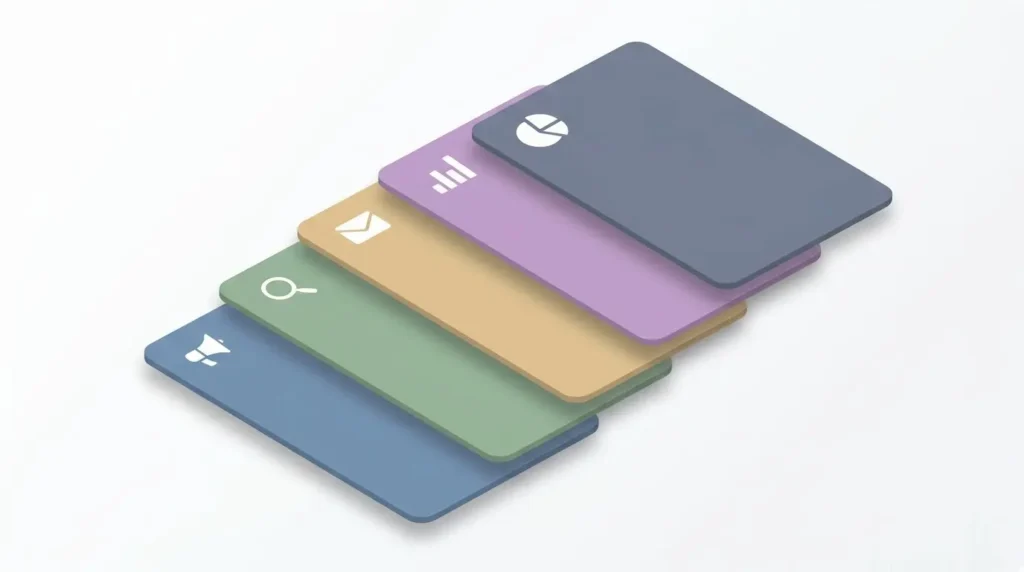
Each project is a different language, and keeping these separate ensures that everything runs smoothly and that the system is scalable if you need to bring on additional clients.
Avoiding this one mistake will change your entire perspective on how to use Claude for marketing automation.
How to Use Claude for Marketing Automation: The 7-Workflow Framework.
Let’s take a look at the seven specific workflows, which define how to use Claude for marketing automation at scale.
Workflow 1 — Brand Context That Never Needs Re-Explaining.
This is the foundational step in mastering how to use Claude for marketing automation for client management.
Setup: In the custom instructions section of your Brand HQ Project, you can enter a detailed brief that includes your brand voice and tone (with examples of good and bad writing), your target audience personas, your competitive analysis, your product or service overview, and your content guidelines. You can also upload documents such as your brand style guide, your best-performing blog posts as examples, your competitor analysis, and any customer research data you have available. Each conversation you start within this project will automatically reference all this information.
Why it works: Claude can store up to 200,000 tokens of context per project, or about 500 pages of documents [2]. This is plenty of space for multiple brand playbooks, research documents, and content example libraries to exist without competing with one another.
Pro tip: Add three to five examples of content you’d like to prevent Claude from producing, in addition to the content you’d like to teach Claude to produce. Negative examples are the best teacher for helping Claude avoid generic AI writing.
Workflow 2: Automated Content Calendar Using Claude.
An automated content calendar is one of the most valuable workflows you can create to see how to use Claude for marketing automation in action daily.. The vision here is to go from “I need some ideas for the blog” to a repeatable machine for creating content month over month.
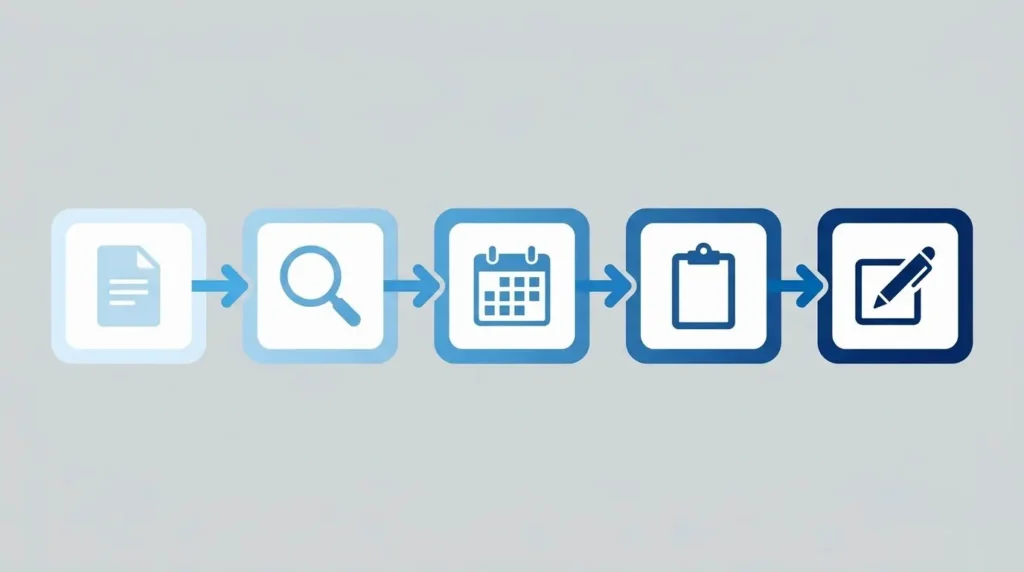
Here are the steps in the workflow, which will appear in the “SEO & Content” project in your conversational interface with Claude:
- Brief Input: Input your keyword cluster, audience pain points, search intent notes, etc.
- Research Prompt: Ask Claude to “tell me the top angles competitors are writing about,” “find me three to five citable data points,” and “what differentiated angle can I take on each of these topics?”
- Calendar Output: Ask Claude to “produce a 30-day content calendar, including titles, target keywords, meta descriptions, internal link suggestions, word counts, etc.”
- Brief Generation: Ask Claude to “create a content brief, including angle, outline, key claims to make, sources to reference, etc.” on each of the topics in the calendar output.
- First Draft: Load the brief, then ask Claude to “write the first draft of the content in the same project conversation.”
A standard blog post of 1,500 words would have previously taken between 8-10 hours of work. Now, with the help of an AI, it can be done in under 2 hours, start to finish[5].
The structured content calendar further helps this process along by front-loading all of the thinking, so when you sit down to write, it’s all done for you.
Workflow 3 — Claude Projects for Brand Guidelines (Multi-Client Scale).
Agencies with five or more clients also have a particular problem, however, in that every client has different brand rules, and getting them mixed up in any output means a trust-break.
Learning how to use Claude for marketing automation through Projects for brand guidelines helps solve this problem. Every client has a new Project, and everything they need, such as style guide, persona document, and sample content, is inside this Project, with nothing leaking out.
Custom Instructions (or ‘Skills’), such as reusable instruction packages, can be used in any conversation and are composable. Your brand guidelines instructions can be used in combination with other saved Project knowledge you’ve developed, such as a product research Skill or a writing standards Skill, to create output that is not only visually accurate but also meets your overall requirements[9].
For example, a #BrandVoice Skill might contain a client’s tone, sentence length, vocabulary, and forbidden words. You can use this Skill in any conversation with a single hashtag, and when the client updates their brand guidelines, you can update your Skill, and the change will be applied to all output instantly.
By using Claude Projects for brand guidelines, agencies can rest assured that the AI will never ‘hallucinate’ a different tone of voice for a particular client.
Workflow 4 — Email Sequence Automation.
Email is where you see the highest ROI when learning how to use Claude for marketing automation. Email marketing offers a 3,600% ROI, or $36 for every $1 spent[6], far and away the best ROI for any acquisition strategy. With an Email & CRM Project, you can get that kind of ROI with a lot less production cost.
The process:
- Enter subscriber segment definitions, historical sequence performance, and promotional content into the Email & CRM Project.
- Ask Claude to write a subscriber sequence (welcome, value, soft pitch, hard pitch, and re-engagement) with each email described and briefed on the particular pain point for that segment.
- Ask Claude to write three different subject lines for each email, with an explanation for each approach.
- Put Claude through a “devil’s advocate” prompt: “What would a skeptical subscriber segment have to complain about at each step, and how does this sequence address those concerns?”
This is not a “one prompt, get email” system. It is a process that uses reasoning to produce email sequences that are actually strategic, rather than just filling space with generated text.
Workflow 5 — AI Marketing Workflows 2026: Competitive Intelligence at Scale.
One of the most underleveraged opportunities for Claude in agency workflows relates to competitive intelligence synthesis. Most agencies currently pull competitive content manually, and this process tends to be slow, variable, and dependent on who has bandwidth one week.
Being ahead of the pack means developing AI marketing workflows 2026 style, where data synthesis occurs across the entire site crawl in just seconds.
Within a new research project, a competitive intelligence document can be uploaded, including a client’s top three to five competitors, their positioning statement, content themes, offer language, and any changes to those messages.
With this document uploaded, a new workflow for competitive intelligence synthesis can be implemented, including:
- Uploading new competitor content on a weekly basis, such as blog posts, email captures, and landing page copies.
- Asking Claude to look for changes in messages, new proof points, and positioning opportunities your client can capitalize on.
- Asking Claude to create a one-pager competitive intelligence document for client presentation.
With its 200k token context window, an agency can ask Claude to look through an entire site crawl, competitor analysis, and campaign dataset in a single conversation, without needing to split those tasks into multiple conversations. This, for serious competitive strategy agencies, represents a structural advantage most point-solution AI tools can’t begin to approach.
Workflow 6 — Reporting Narratives That Don’t Take All Friday.
Reporting is often the most overlooked part of how to use Claude for marketing automation. The data pull could take 30 minutes, but the writing of the narrative about the data, interpreting the results, explaining the anomalies, connecting the data to the client’s goals, can take another two to three hours, depending on the complexity of the report, which in most cases is a monthly report.
However, Claude can reduce the amount of time spent writing the narrative down to under 30 minutes, depending on the proper context.
Within the Reporting Project, the client’s KPI definitions, baselines, and any notes about the client’s business environment are loaded.
When the time comes to produce the report, the following are done:
- Paste in the raw data export, which can be in CSV or plain text table format.
- Prompt: “Analyze this data against our established baselines. Identify the three most important stories, explain what caused them, and draft a two-paragraph executive summary the client can share with their board.
- Follow-up prompt: “Now draft the full narrative for the body of the report, section by section, in the client’s approved report format.”
The output will need editing, but the cognitive burden of staring at a blank document while the clock ticks away is eliminated.
Workflow 7 — New Client Onboarding Acceleration.
The process where agencies typically underperform in bringing in a new client from contract signature to first deliverable is during the knowledge-gathering phase, where discovery calls, brand immersion, understanding the target audience, and competitor research typically take two to three weeks.
Create an Onboarding Project template with a standardized structure:
- Discovery Call Transcript (upload the transcript of the discovery call recording)
- Brand Assets and Guidelines Provided by ClientInitial Competitive Landscape (This can be built out with help from Claude using a quick competitor research prompt)
- Audience Hypothesis Document
- First 90-Day Goals and Success Metrics
One agency saw their SEO Audit Turnaround Time reduce from three weeks to two days thanks to the extended context window allowing entire site crawls, competitor research, and backlink data to be synthesized in one conversation thread[8]. The same concept applies to Onboarding; if Claude can keep the entire context of the client in one thread, the synthesizing work that would normally be required in several threads and revisions can now be accomplished in one structured thread.
In My Experience: What Actually Happened When We Tested This.

I deployed a complete five-project stack for my mid-size B2B SaaS client—an organization with a complex product, a small audience of ops managers, and very specific brand guidelines developed over weeks of work by the client’s in-house designer.
Creating one long-form blog post used to require the writer to read through the client’s 40-page brand guide, extract relevant competitive research, and align tone guidelines found in three different documents. First drafts would need two rounds of revisions just to get the tone right.
But after importing the client’s brand guide, three documents outlining the ideal reader persona, seven reference blog posts with annotations, and one competitive research document into the Brand HQ Project stack, Claude’s first draft nailed the tone on the first try in four out of five tests. The number of revision rounds went down to one. The writer could focus on taking the strategy to the next level and incorporating first-hand expertise rather than worrying about tone.
But perhaps the most surprising improvement was in the content calendar workflow. What used to be a two-hour long monthly planning session was reduced to a mere 25-minute review of a draft calendar created by Claude, where the competitive gaps we had been discussing were already incorporated. Strategic decisions still need to be made, but Claude had already done the connective work that takes the most time.
One thing to keep in mind: Claude isn’t a substitute for strategic thinking. Good teams use Claude as a thinking partner, where context is rich and detailed, and where there’s a human eye on the strategy and the performance data[13]. “Generic” prompts produce “generic” output. These workflows succeed because of the quality of the context loaded into the Projects, not in spite of it.
| Workflow Pillar | How to Use Claude for Marketing Automation | Key Benefit |
|---|---|---|
| Brand Identity | Use Brand HQ Projects for voice consistency. | Zero context tax. |
| Content Ops | Use SEO Projects for automated content calendars. | 80% time reduction. |
| Outreach | Use Email Projects for sequence reasoning. | 3,600% ROI. |
| Reporting | Use Reporting Projects for data narratives. | Friday afternoons saved. |
Anthropic Claude vs. ChatGPT for Marketers: What Actually Matters.
This is a comparison that is raised every time, and the honest truth is that it really depends on your workflow priorities.
Claude excels at coding performance, is better at natural writing with a human-like tone that requires less editing, and has a larger context window (200K to 1M tokens) and a fresher knowledge cutoff[11]. ChatGPT’s advantages include native image creation through DALL-E, audio and video capabilities, a broader plugin set, and cheaper API costs.
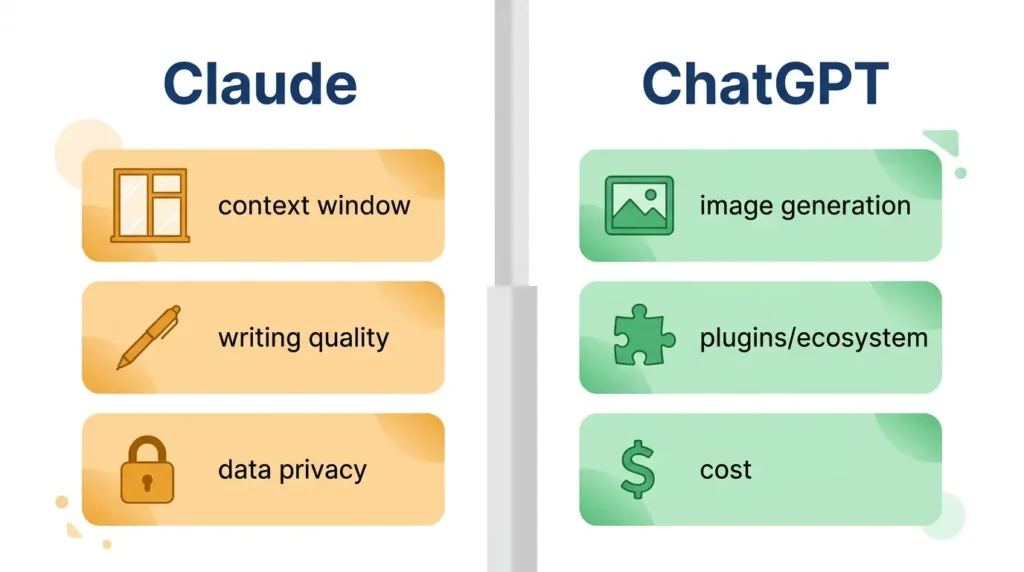
The relevant comparison factors for agency marketing workflows are:
- Context window size: The 200K+ context window size that Claude has built-in is critical when loading entire brand guidelines, research documents, and campaign histories. If your process involves keeping more than a handful of documents in context, Claude has a significant structural advantage.
- Writing naturalness: At least two writers have reported that writing produced by Claude needs fewer passes to be indistinguishable from a human writing. If your process involves a high volume of writing, this advantage will compound rapidly.
- Enterprise data privacy: The fact that Anthropic has a clear stance that enterprise data will never be used for model development removes the major obstacle for agencies working with confidential client strategies[11].
- Image generation: ChatGPT with DALL-E has this one hands-down, as Claude does not have native support. If image generation is a critical part of your process, this one will be important.
Practical Recommendation: Use Claude as your primary writing and reasoning tool because of the Projects architecture, and use image generation tools like DALL-E, Midjourney, Adobe Firefly, etc., for image creation.
The One Metric That Tells You If Your AI Marketing Workflows Are Working.
Most agencies monitor AI adoption by the volume of output produced: the number of blog posts created, the number of emails drafted. This is the wrong metric.
When assessing how to use Claude for marketing automation, your primary metric should be revision cycles reduced.
If the output of your AI-driven content process still requires two or three rounds of brand alignment revisions, then the context of your Project is too loose. Each and every revision cycle provides exact insight into what context was lacking when Claude created the first draft of the output – which means each and every revision cycle is training material to improve the context of your Project.
Monitor the number of revision cycles on a weekly basis for the first month of use. Identify the most common types of corrections required. Update the Project with explicit instructions on how to correct these common mistakes. If Claude produces output that’s off the mark, then tell it what it got wrong and ask it to update the Skill file accordingly. That’s a permanent change.
Agencies with a high level of this process refinement see a reduction of 40-60% in the number of required revision cycles after four weeks of initial setup[12].
What to Build First?
So, if you’re not going to do anything else with the rest of this guide, you’re going to build ONE thing this week: A Brand HQ Project, using the highest-volume client.
Open their brand guide. Upload 3-5 reference pieces, annotated. Include 10 phrases they’d never use and 10 phrases that are uniquely theirs. Run 1 piece of deliverable content through the system:
A blog post, email, campaign brief, etc. and compare the process to the baseline.
This is your primary business case for how to use Claude for marketing automation across your entire agency.
While 2025 was the year marketers got familiar with AI, 2026 is the year they become an expert in the technology[7].
The agencies that build the system now, not just the ones using AI to automate tasks, are the ones that will own the efficiency advantage in 18 months. The window is smaller than you think.
You build the system, and the outputs will take care of themselves.
FAQs
▶ How do I set up Claude Projects for brand guidelines?
▶ What are the most effective AI marketing workflows 2026?
▶ What wins the Anthropic Claude vs ChatGPT for marketers debate?
▶ Can I create a fully automated content calendar with Claude?
▶ How does Claude automation help scale an agency?
▶ Is my client data safe with Claude’s automation?
▶ What is the typical ROI for AI-driven automation?
▶ Can Claude handle multi-channel marketing campaigns?
▶ Sources and References
[1] Digital Silk / Marketo — Marketing Automation Statistics 2026
[2] Anthropic — Claude Projects documentation
[3] McKinsey & Company — The State of AI 2025
[4] ALM Corp — AI-Powered Marketing Automation in 2026
[5] Cubeo AI — 25 AI Marketing Statistics Every CMO Should Know in 2025
[6] All About AI — AI Marketing Statistics: The Complete Performance Report
[7] Klaviyo — 8 Marketing Automation Trends for 2026
[8] Digital Applied — Ad Agencies on Claude Enterprise: AI Marketing Ops
[9] Passionfruit — How to Use Claude for Marketing in 2026
[10] Passionfruit — Claude Projects for Marketing Teams: Complete Setup Guide
[11] Max Productive — Claude AI Review 2026: Features, Pricing & Comparison Guide
[12] Thunderbit — Marketing Automation in 2026: 45 Stats and Insights That Drive ROI
[13] Marketing Agent Blog — How To Use Claude For Digital Marketing In 2026